

Mid-semester is a tricky time. Students are deep in the rhythm of the unit, assessments are looming, and any feedback we gather needs to be useful enough to act on quickly – while there’s still time for it to matter. As two anthropologists teaching across undergraduate and postgraduate units, we’ve been experimenting with Padlet as a way to make this feedback feel less like a survey and more like a dialogue: one that helps students speak up and supports our responses in real time. In this post, we share what’s worked, why it works, and how you can set it up in your own Canvas site.
Why does mid-semester student feedback matter?
Seeking student feedback in the middle of semester is vital in giving educators a chance to improve units while they are still unfolding, to the benefit of existing student cohorts. When mid-semester feedback is actively solicited, and when educators commit to action the feedback received as far as possible, students are more likely to feel respected and invested, because they can see that their experiences matter and are being taken seriously.
This strengthens trust, engagement, and learning, which in turn demonstrates to students our commitment to better teaching, greater inclusion, and student success. It also sends a powerful pedagogical message: that teaching is relational, responsive, and open to adjustment.
One method that we have found particularly helpful in soliciting student feedback, and that our students have reported positively on, is using Padlet. As a technology, Padlet offers specific design affordances for engaging with student feedback practice.
What is Padlet?
Padlet is an online collaborative platform where users can post, organise, and share content on a virtual board. Teachers and students can add text, images, links, videos, documents, voice recordings, and comments in one shared space. Posts can be arranged in different formats, such as a wall, grid, timeline, map, or column layout.
Padlet is commonly used in the classroom for brainstorming, discussion, collaborative learning, group work, and resource sharing. It is simple to access through a link or QR code, and privacy settings let creators control who can view, post, or edit. It is designed to be visual, flexible, and easy.
What are the advantages for students of using Padlet?
Using Padlet to gather mid-semester feedback offers a range of benefits for students and instructors, making the process more engaging, accessible, and actionable.
For students, one of the most immediate advantages of Padlet is its ease of use. The platform is intuitive and requires minimal technical knowledge, allowing students to focus on contributing their thoughts rather than navigating complex interfaces.
Aligning with the Universal Design for Learning Guidelines and the USYD Green Guide for increasing equitable learning experiences, this accessibility lowers barriers to participation, particularly for those who may feel less confident with digital tools. While class time can be given to contributing to the Padlet, the affordances of the technology allow students to easily return and add further ideas over time. This improves access for those who perform better with time to process, reflect and return to express their ideas.
In addition, Padlet’s visually appealing layout – often organised as a wall of colourful or patterned posts, columns, or grids, with comments submitted by Padlet-generated, creative pseudonyms like “Bamboo Whisperer” or “Sunlit Fjord” – creates a more inviting and less formal space for feedback. Compared to traditional survey formats, it feels more interactive and even enjoyable, encouraging higher levels of engagement.
The Padlet wall can also be organised around a series of prompting questions like “what has been the most interesting reading, topic or activity in the Unit thus far?”, “What are your favourite ways to participate in lectures or tutorials?”, “What challenges have you faced with the Unit?”, or “What is one thing you wish we could do differently?” These can act as ‘metacognitive supportive practices,’ helping students to reflect on their learning growth in an open and inviting way.
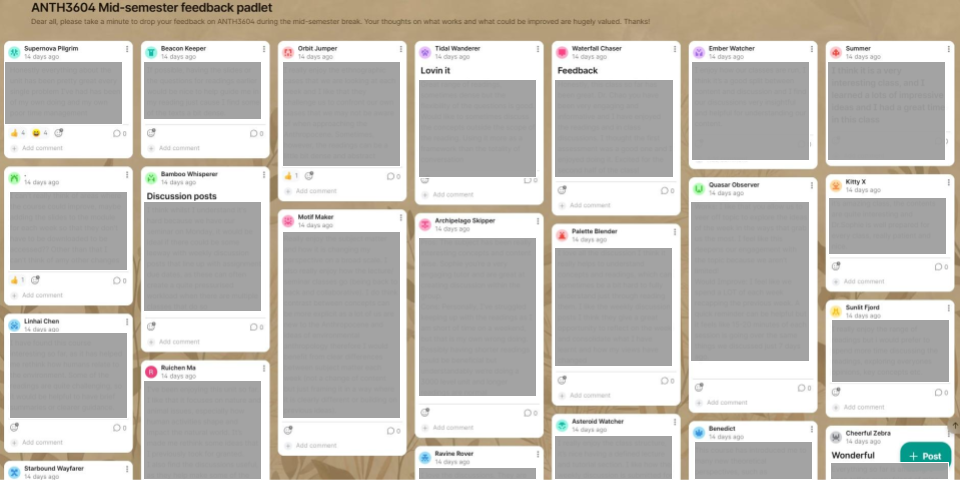
Most importantly, Padlet supports a dialogic or relational form of feedback. Students can see and respond to one another’s comments -agreeing, disagreeing, or building on shared concerns. This creates a sense of collective reflection and can validate individual experiences (e.g. “I’m not the only one struggling with this”, “What I see as a weakness is experienced by one of my peers as a strength of this course”, “I can add to that comment from my own experience”). It also encourages students who might otherwise remain silent to contribute, as they can simply endorse (via a ‘hearting’ feature) or expand upon existing posts rather than generate entirely new ones. Crucially, seeing peer comments can reveal to students where the challenges they face are a result of barriers arising from teaching and learning practice, rather than individual student failures. In these ways, Padlet can build confidence and foster a more participatory feedback culture within and beyond the classroom.
The layered interactions that Padlet enables tend to generate a more nuanced body of contributions than isolated responses typically allow. For example, a single student’s comment about the pace of lectures might be taken up by others who specify which weeks felt rushed, or countered by peers who found the pace appropriate but struggled with a different aspect of the course. The result is not just a list of issues, but a textured understanding of how different students are experiencing the same learning environment.
This dialogic process also supports the development of critical and reflective skills. Engaging with peers’ perspectives requires students to evaluate, articulate, and sometimes reconsider their own views. In this sense, feedback becomes a pedagogical exercise in itself – an opportunity for students to practice respectful critique, to recognise diversity of experience, and to think more carefully about what constitutes effective teaching and learning.
What about the benefits for educators?
Padlets are integrated into Canvas, allowing them to become a seamless part of the unit environment, requiring little additional setup (see “4 Steps to a Canvas Padlet” below). Instructors can easily display the Padlet during class and walk through student comments in real time, including explaining what they have actioned on the basis of the comments visible to students. This visibility allows teachers to acknowledge feedback transparently and also to demonstrate that student voices are being taken seriously – in their own words, and on their own terms.
Padlet also facilitates the process of “closing the loop.” Instructors can respond directly to student posts – clarifying misunderstandings, outlining planned changes, or explaining why certain suggestions may not be feasible. This responsiveness helps build trust and shows students that their input has tangible effects. Rather than feedback disappearing into an anonymous survey system, it becomes part of an ongoing conversation.
Coupled with an appealing interface and dialogical format, participatory feedback Padlets combine the option of protective anonymity with a more transparent process for students and instructors who co-create the learning space. Transparency fosters a degree of openness and accountability for the instructor and for the group as a whole. If someone expresses difficulty with the classroom climate, the feedback is an invitation for collective reflection on practice.
Finally, Padlet functions as a live document that can be revisited and updated over time. Teachers can return to the board throughout the semester to track recurring themes, monitor the impact of implemented changes, and maintain an open channel for student input. This dynamic quality transforms feedback from a one-off exercise into a continuous, evolving dialogue.
Towards relational feedback
To sum up, Padlet enhances mid-semester feedback by making it more relational, interactive, inclusive, and transparent. It empowers students to share their perspectives in a supportive environment while equipping teachers with a practical tool to listen, respond, and adapt in meaningful ways. Because students can see others’ comments, common concerns or shared experiences often become visible very quickly. The platform supports short written responses, images, links, and comments, so feedback can be flexible rather than restricted to fixed survey boxes. For instructors, Padlet provides feedback in one organised, easy-to-read space, making themes, patterns, and areas for improvement easier to identify.
Setting up Padlet for mid-semester feedback
Getting access to a USYD Padlet account
To set up your University of Sydney Padlet account:
- Go to the University Padlet login: https://sydney.padlet.org
- Click “Log in with Microsoft”
- Sign in with your university email and follow the prompts
Once set up, you can access your account anytime at https://sydney.padlet.org. If you already have a USYD Padlet account, the same steps will sign you in.
Embedding Padlet in Canvas
There are two ways to bring a Padlet into your Canvas site, and the choice shapes how students encounter it.
Option 1: Hyperlink via the Modules page
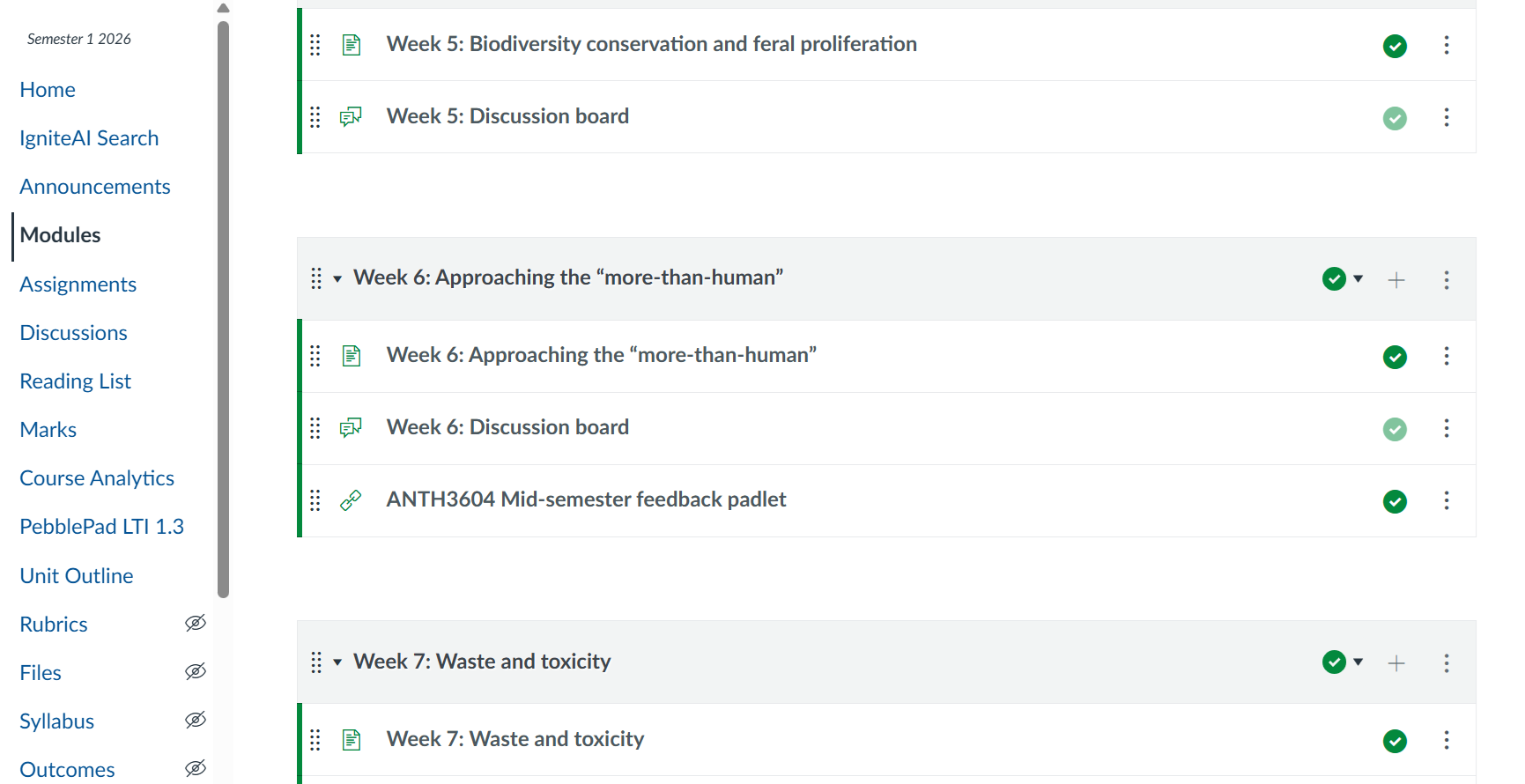
Adding a hyperlink to Padlet via Canvas Modules renders the Padlet more visible within the weekly flow of classes and makes it easier for students to locate alongside other weekly materials. This option is ideal for situations when the Padlet is supplementary, optional, or likely to be viewed on different devices, where a full-screen experience is clearer.
- Go to the Module for the week you’re running mid-semester feedback
- Click the “+” sign on the top right
- Select “Add” > “External Tool” > “Padlet LTI 1.3”
- Click “Make a Padlet” and choose your format (“Wall” works well for open-ended comments; “Columns” is useful for organising responses around specific questions)
Option 2: Embed directly into a Canvas page
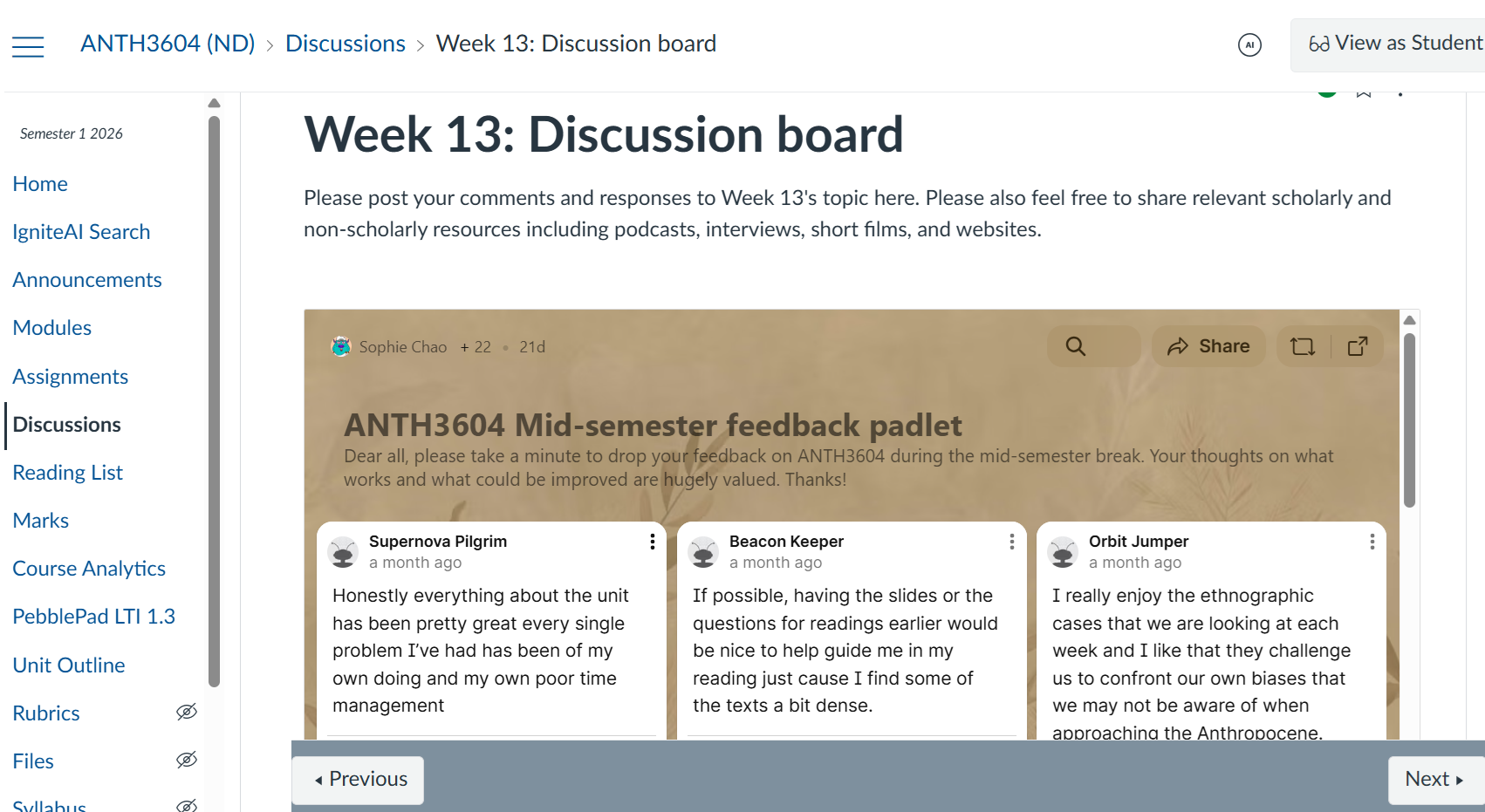
Embedding Padlet directly into a Canvas page enables seamless, real-time interaction within Canvas LMS, allowing students to view and contribute without navigating away from the learning content. This option is ideal if you want students to interact with the Padlet as part of the core learning flow – for instance, live brainstorming, in-class activities, or tightly scaffolded tasks.
- Open your Padlet, click “Share”, Select “Embed”, and copy the embedded code
- Go to “Pages” in your Canvas course, click + “Page” (new) or open an existing page and click “edit”
- In the editor, click “</> (HTML Editor)”
- Paste the Padlet embed code where you want it to appear, and click “Save”
Sharing with students
Once your Padlet is set up, you can personalise the background and title, and share it with students as a hyperlink or QR code. Canvas saves all Padlets, so you can reuse and adapt them across consecutive years and different units – handy for tracking how feedback patterns shift over time.
If you give this a go in your own unit, we’d love to hear how it lands.