

Who can contribute to Teaching@Sydney?
Teaching@Sydney is a collaborative and interactive site that allows anyone with a Sydney UniKey (staff and students) to write and share practice related to teaching and learning. Our readership is broad, stretching across Australia and the world, with over 17,000 subscribers to our periodic mailout. We welcome submissions under key categories of teaching tips, educational excellence, teaching research, and news and events.
What can I write about?
As the name suggests, Teaching@Sydney, is a space for sharing anything that relates to teaching and learning at the University of Sydney. Potential stories might include examples of innovative teaching, an encouraging story of student engagement, an exciting teaching and learning project, an impactful tool or approach, or news about a recent grant, publication, or award.
There are four key categories:
- Teaching tips – Practical tools, approaches, or guidelines for teaching, learning, and assessment
- Educational excellence – Showcases, interviews, grant stories, or teaching success examples
- Teaching research – Research findings, conference updates, or theoretical insights
- News and events – Announcements, workshops, conferences, grants, and awards
Additionally, the Sydney updates category is used by the Deputy Vice-Chancellor (Education and Students) team to share university-wide updates on tools, learning spaces, or policy.
Posts can be full-length articles (approximately 1000 words), opinion pieces, interviews, or short updates, and can be multi-authored. For academic colleagues they may be considered non-traditional research outputs.
How does my article get published?
There are several steps to publishing an article on Teaching@Sydney. These are listed below.
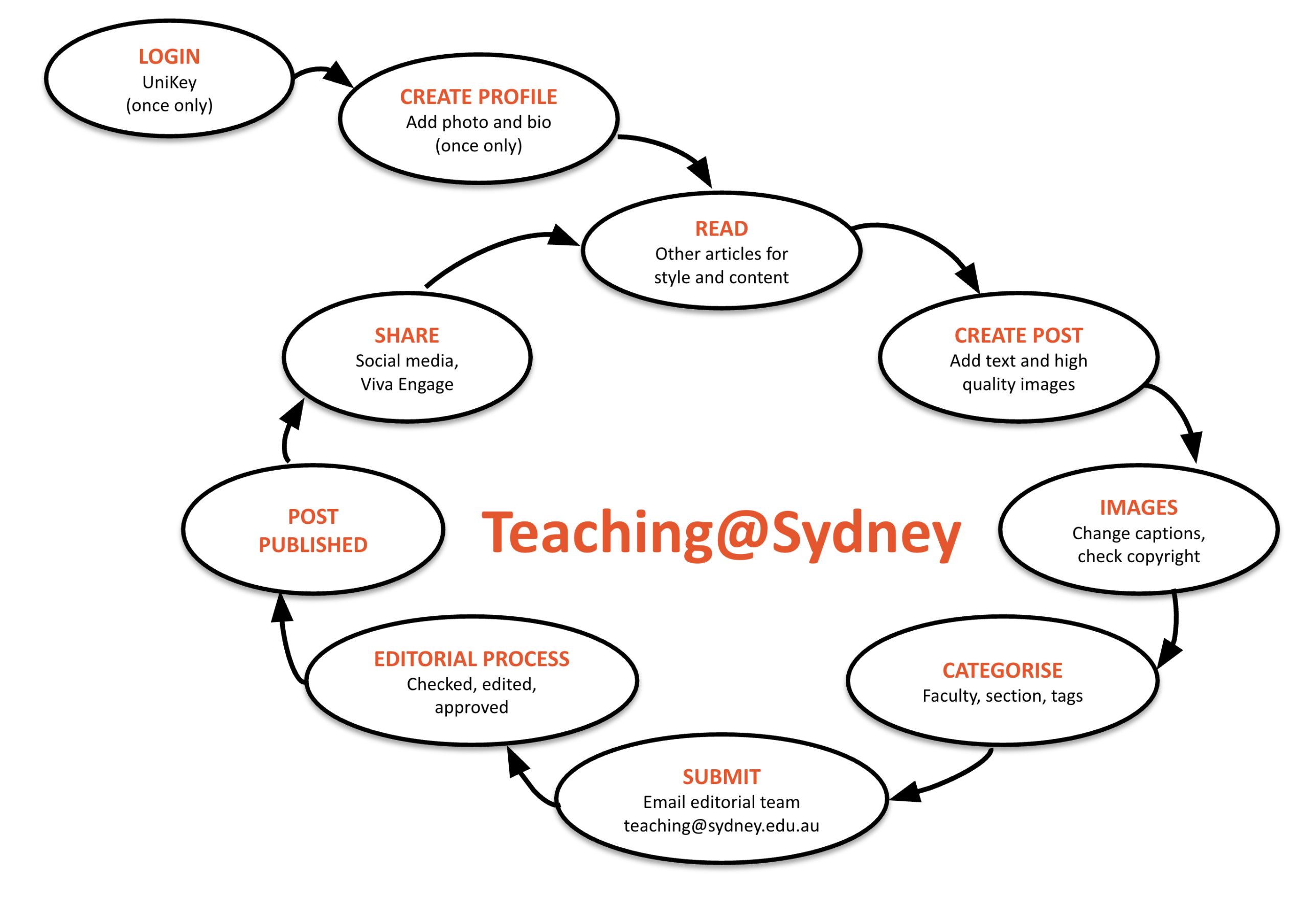
Step 1: Login
To begin, login via the homepage using your UniKey credentials. Once logged in you will see the Teaching@Sydney dashboard. If you have any previous experience with using WordPress for blogging, this may be familiar to you. If not, use the menu on the left-hand side of the page to navigate, and make use of resources available online.
If your piece is co-written, all authors need to complete this step before the article is submitted for editorial consideration. See step 7 for more instructions.
Step 2: Create your author profile (you only need to do this once)
After you have logged in for the first time you will need to set up your author profile. You can access this via the menu on the left hand side of the screen. Go to ‘Users > Your profile’. Add you contact information and upload a profile image using the Gravatar feature/service. Unless you wish to change your contact details or profile image, you will only need to do this once.
Step 3: Read other articles for style and content
Before writing, read existing Teaching@Sydney articles to understand what works well for our audience. This will save time in the editorial process.
What to look for:
-
- Conversational style – Notice how posts differ from academic writing: they use first person, avoid jargon, and prioritise clarity with short paragraphs and subheadings
- Practical takeaways – Strong posts answer “What are the implications for broader teaching practice?” and “How can educators in other disciplines use or adapt this approach?”
- Transferability – Posts ground insights in specific examples while making them applicable beyond the author’s context
What to avoid:
-
- Discipline-specific content without broader teaching insights
- Academic writing style (formal referencing, dense paragraphs, jargon)
- Theory without practical application
When drafting, consider what a colleague in a completely different discipline could take from this post.
Step 4: Create a post
After logging in to Teaching@Sydney, create your post via ‘Posts > Add new’. If you’re new to WordPress, reference online resources for guidance. You can write directly into the content editor or copy and paste from a Word document.
Writing guidelines:
Teaching@Sydney is publicly accessible. We welcome a conversational tone but ask that you:
-
- Write with professional respect for colleagues and students
- Avoid content that could reflect negatively on yourself, others, or the University
- Do not include sensitive or confidential information
- Obtain student permission before including their work
Always keep in mind the University of Sydney staff and student codes of conduct, the public comment policy, and the ICT resources policy.
The Teaching@Sydney style guide provides additional guidance.
Step 5: Add media
Images are the primary form of media used in articles, but videos and audio files can also be included. Images should be high quality but not larger than 2MB, with clear colours and good lighting. If using Creative Commons material, choose images that are well-lit, non-grainy, and suit your content.
Types of media:
-
- Feature image – The main headline image for your article. Add this using the ‘Feature Image’ section on the left-hand side of your ‘Edit Post’ screen or email to the editorial team. This should relate to your article (literally or conceptually).
- Embedded media – Supporting images, videos, or audio within your article body. Add these using the ‘Add media’ button underneath the post title. All embedded media must include alt text and captions. Refer to Vision Australia’s guidance for writing effective alt text.
Image attribution and sourcing:
When uploading any image, add a caption including:
-
- Your own images: Include image title, author (you), and date created
- Student work or images of students: Obtain written permission from students before publishing. Include appropriate attribution in the caption
- Images sourced online: Must be licensed under Creative Commons. Include image title, author, date, and source location (e.g., Adobe Stock)
We recommend using the University’s licensed Adobe Stock access (sign in at stock.adobe.com with your Sydney email). For other images, ensure you have permission to publish.
Step 6: Categorise the post and add tags
Categorise your post: Use the ‘Categories’ tool on the right-hand menu to select where your article should be featured. Choose your faculty and one content section:
-
- Teaching tips – Practical tools, approaches, or guidelines for teaching, learning, and assessment
- Educational excellence – Showcases, interviews, grant stories, or teaching success examples
- Teaching research – Research findings, conference updates, or theoretical insights
- News and events – Announcements, workshops, conferences, grants, and awards
Add tags to your post: Tags are keywords that help readers find your article. Use the tags tool on the right-hand menu. Aim for 3-5 relevant tags.
Choose from existing popular tags when possible (e.g., assessment, student engagement, Canvas, feedback, active learning). Create new tags only if existing ones don’t fit (e.g., avoid creating student-engagement if student engagement already exists).
Step 7: Multi-author posts
By default, submissions can only be authored by one person. Ensure that multi-authored posts have been through internal author review before they are uploaded to WordPress, and that the below steps are completed before the piece is submitted for editorial review:
-
- All authors must complete Step 1 (login) and Step 2 (create author profile) before submission
- When you email the editorial team on submission (Step 8), include the full author list in the order they should appear
The submitting author is responsible for ensuring editorial feedback is communicated to and approved by co-authors.
Step 8: Submit for editorial review
Once you have saved your work, submit it for publication by clicking the ‘Publish’ button in the right-hand menu next to your post. At the same time, email [email protected] to notify the editorial team that your article is ready for review.
The editorial team will review your submission to ensure it meets the criteria for inclusion and will perform minor editorial tasks such as adjusting headlines, formatting, image captions, and links. There is no capacity for full proofreading, rewriting, or substantive editing, so please submit your article as close to publication-ready as possible (proofread, spell-checked, complete with images).
If revisions are needed: The editorial team will email you with requested changes. Make the revisions to your post in WordPress and email [email protected] again to resubmit. If changes are applied, your post will progress to publication. If revisions are still not sufficient, the post will be sent back for further work. Major changes can be requested if posts are not aligned with core categories (Step 6) or do not show engagement with writing guidelines (Step 4). The best way to ensure your post is published is to engage with recently published pieces.
Turnaround time: 6-8 weeks from submission to editorial decision.
Step 9: Your post is published
Congratulations – your post has been accepted! An editor will email you with a link to your published article. New posts are also accessible via the Teaching@Sydney homepage.
Step 10: Share
Once your article is published, share it with your networks to increase its reach and impact. You can send the link via email or post it on Viva Engage, LinkedIn, or other social media platforms. Consider tagging @Sydney_Uni (or relevant university accounts) when sharing.
Step 11: Write more…
Having created your post, you’re welcome to continue contributing content relevant to teaching and learning at Sydney. Every post you author will be attributed to you and visible on your author profile page at:
https://educational-innovation.sydney.edu.au/teaching@sydney/author/[your-unikey]/
(Replace [your-unikey] with your Sydney UniKey)
Please contact the Teaching@Sydney editorial team at [email protected] if you have any questions about the contribution process.